This document includes the basics about AI for genealogy, what the features mean, and which features matter most to you as a family tree researcher. It also includes several standalone prompt ideas that you can use with your AI platform of choice.
At the end of the document, I’m including instructions and a prompt that will enable you to create a long-term genealogy partner.
Popular Platforms
Claude
- Strengths: Excellent at careful reasoning and long documents; strong Projects feature on paid plans (with retrieval so it can handle more material); very good at not overclaiming when you remind it to stay evidence-based.
- Weaknesses: Large plain-text files (like big GEDCOMs) often hit the context window quickly; free plan is more limited; less built-in ability to run code against a file sitting on the side.
Grok
- Strengths: Handles larger GEDCOMs and data files well because it can use tools/code to query the file instead of loading everything into the conversation at once; Projects keep files and instructions available across chats; Grok Bot adds a persistent computer for longer or recurring tasks.
- Weaknesses: Newer ecosystem than ChatGPT; some advanced features (especially Bot) are still evolving.
Gemini
- Strengths: Deep Google integration (Drive, Docs, etc.); strong multimodal abilities; large context on paid plans; good for people already living in Google Workspace.
- Weaknesses: Can be more variable in how strictly it sticks to “only use what I gave you”; Projects/knowledge features are less mature than Claude’s or Grok’s for long-running research.
ChatGPT
- Strengths: Mature tools (especially the code interpreter / Advanced Data Analysis); huge number of custom GPTs and community examples; reliable for structured tasks and writing.
- Weaknesses: File size and context limits still constrain very large genealogy datasets unless you break them up; Projects exist but feel less central than in Claude or Grok for ongoing research.
Cursor / Grok Bot
- Strengths: Persistent computer and the ability to run longer, multi-step, or recurring work (great for processing big files, maintaining research notes, or scheduled checks); files and results stay available.
- Weaknesses: Steeper learning curve if you’ve never used an AI with its own computer; overkill for simple one-off questions. (Most people won’t need this at the start; it’s more useful once you’re comfortable and have bigger or recurring tasks.)
If you’re just experimenting, any of the free tiers will work. If you plan to do ongoing research with larger files or want Projects, the differences above become more important.
AI Platform Pricing Options — What’s the difference?
When you look at Free vs. paid plans, the bullet points can be vague. Here’s what the common ones mean in practice, especially if you’re using the tool for family history.
Usage limits (“every 5 hours,” “limited messages,” “higher limits”)
How much you can talk to the AI before it slows you down or cuts you off. Free plans usually give you a modest amount every few hours or per day. Paid plans give you more. For genealogy this matters once you start uploading documents, asking follow-up questions, or working on a problem for more than a few minutes at a time. Light experimenting is fine on Free; real research sessions usually feel better on a paid plan.
Memory across conversations
The AI can remember some facts or preferences from earlier chats instead of starting from zero every time. Useful for “we’re working on the Morris line” or “always cite sources,” but it is not a substitute for saving your actual notes or family group sheets. Treat memory as a convenience, not your research file.
Projects (Claude Pro, ChatGPT Plus, Grok)
A dedicated workspace that keeps related chats, uploaded files, and custom instructions together. This is one of the most useful paid features for genealogy. You can have one Project for a brick-wall family, another for DNA matches, etc., and the AI remembers the context and files inside that Project.
Connect your apps and tools / Claude in Chrome & Microsoft 365 / Gemini in Gmail & Docs
The AI can look at or work with things in your other accounts (Google Drive, Gmail, Microsoft 365, browser, etc.). Helpful if a lot of your research already lives in Google Docs or email. Not required if you prefer to copy-paste or upload files directly.
Create files / run code / Artifacts / Canvas / Codex
The AI can generate downloadable files (Word docs, spreadsheets, etc.) or run code to analyze data. This is what lets some platforms turn messy notes into a clean family group sheet, build a timeline spreadsheet, or query a larger GEDCOM without stuffing the entire file into the chat. Free plans often include a limited version; paid plans usually give you more capacity.
Image generation and editing
The AI can create or modify pictures. Mostly irrelevant for traditional genealogy research (you’re usually analyzing existing record images, not generating new ones). Nice for other hobbies, not a reason to choose a platform for family history.
Deep Research
The AI does a longer, multi-step web search and synthesizes what it finds. Can be handy for background on a place, a record type, or a historical context. Still needs your verification—especially for specific ancestors.
Voice chats / Gemini Live
You can talk to the AI out loud. Convenient for some people; not especially important for most genealogy work.
More / advanced models (Flash vs Pro, GPT-6 reasoning, etc.)
Paid plans usually unlock smarter or more careful models. For genealogy this often shows up as better handling of long documents, fewer made-up details when you ask it to stick to the evidence, and stronger reasoning when you’re comparing two possible identities.
Scheduled tasks / hand off and schedule tasks
The AI can do something later or on a repeating schedule (e.g., “check this every Monday”). More relevant once you’re comfortable; not a starter feature.
Storage (Gemini)
Extra Google Drive space. Only matters if you’re already storing a lot of record images or documents in Google and are running out of the free 15 GB.
Custom GPTs / Gems
Pre-made or custom “mini versions” of the AI set up for a specific job. You can find or create ones aimed at genealogy, but a well-written Project instruction (like the research-partner prompt) usually does the same job.
Quick genealogy takeaway
The features that most often make a paid plan worth it for family research are:
- higher usage limits (so you can actually finish a session),
- Projects (so your work and files stay organized), and
- better file/code handling (so larger notes or GEDCOMs are usable).
Image generation, voice, and creative studio tools are fun but rarely the reason a genealogist upgrades.
AI Definitions for Genealogists and Why They Matter
Quick glossary of terms you’ll see when comparing AI tools for genealogy:
- Context window — The amount of text the AI can hold in mind at once in one conversation. Larger is better for long documents, but a big GEDCOM can still fill it if the whole file is loaded.
- File upload limits & handling — Maximum file size you can attach, plus whether the AI loads the whole file or can query it with tools. This is why some platforms handle a 20 MB GEDCOM easily while others struggle with smaller ones.
- Projects / Workspaces — A dedicated space for related chats, files, and instructions. Keeps ongoing research organized.
- Memory — The AI’s ability to remember some facts or preferences across chats. Convenient, but not a replacement for your own notes.
- Code execution / tools / computer access — Ability to run code or use tools so the AI can query large files instead of loading everything at once.
- Document & image analysis — Ability to read scanned records, deeds, wills, or handwriting. Always double-check names and dates.
- Plans & limits — Free tiers work for experimenting. Paid plans typically add higher usage, Projects, and better file capacity for real research volume.
These differences are why one platform may feel dramatically better than another for the same genealogy task, even if they all “can chat about family history.”
Starter Prompts
The prompts in this section are good for getting your feet wet with using AI for genealogy.
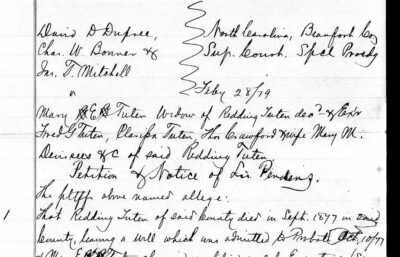
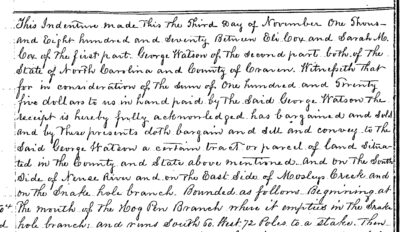
1. Work with old documents, pictures of deeds, wills, etc.
Upload an image into your AI chat window (you can either drag and drop if you’re on your computer or use the + sign if you’re using the AI chat app, like Gemini or Claude, on your mobile phone or tablet) and then just tell the AI this:
Please transcribe this document and provide an abstract that I can add to my research notes or family tree.
Note: If the AI transcribes a name or place wrong, you can correct it and ask it to retranscribe the document. Free models will make more transcription mistakes that paid models. Always check to make sure what the AI says for the pertinent details match what is in the document.
2. Turn messy notes into a clean family group sheet
Here are my rough notes about [Person’s full name]. Please turn them into a clean, traditional family group sheet format. Include sections for birth, marriage, death, parents, spouse(s), and children. Flag anything that looks incomplete or inconsistent.

[Paste notes copied from emails, text or Word documents, etc. or upload notes files directly]
3. Explain a confusing record
I’m new to reading old records. Please explain what this document is saying in simple terms, and point out any important clues for genealogy research.

[Paste text or description of the record]
4. Create a simple research to-do list
I want to learn more about [Person’s name], born about [year] in [place]. Based on the information I have so far, give me a short, practical list of the next 5 records or searches I should try.

Here’s what I already know:
[Paste what you know]
Intermediate Prompts
Once you’ve gotten the hang of chatting with AI about your research, these prompts will help you take things further.
5. Compare two possible identities
I have two people who have the same name and they are close to the same age. One of them is my [ancestor relationship] and the other isn’t, but I can’t tell which from the records. I’d like you to help me sort out who’s who. Tell me what you need from me so we can get started figuring this out.
6. Extract every name and date from a long document
Please go through this document and extract every personal name, date, and place mentioned. Present them in a clean list or table. If any relationships are stated, include those too.

[Paste text]
7. Draft a source citation
Please write a clear source citation for this record in a standard genealogy format (Evidence Explained style if possible). Here’s the information I have about where it came from:
[Describe the record and where you found it]
8. Identify research gaps
Here is what I currently know about [family or person]. Please review it and list the biggest gaps or unanswered questions. Rank them from most important to least important for moving the research forward.

[Paste or upload your summary or family group sheet, etc.]
More Advanced Prompts
These prompts can help you solve advanced genealogical or DNA problems.
9. Analyze a cluster of DNA matches
I have a group of DNA matches who all seem to share a connection through [suspected ancestor or place]. Here are the match details (names, shared cM, trees if known, and any shared matches). Please help me analyze possible relationships and suggest the most likely common ancestor scenarios.

[Paste match information]
10. Build a timeline from scattered facts
Please take all of these scattered facts about [Person’s name] and organize them into a chronological timeline. Note any conflicts in the dates or places, and highlight periods where there are large gaps.

[Paste all the facts you have]
11. Write a short narrative from evidence
Using only the facts I provide below, write a clear, neutral narrative biography of [Person’s name] suitable for a family history. Do not add any information that isn’t supported by what I’ve given you. If something is uncertain, say so.

[Paste documented facts]
12. Plan a focused research project
I want to solve this specific question: [State the research question clearly].

Here’s the evidence I already have and the sources I’ve already checked. Please help me design a focused research plan, including which records to search next, in what order, and what I should be looking for in each one.

[Paste current evidence and negative searches]
Helpful Tips
- Always tell the AI what you already know and what you want it to do.
- Paste the actual notes or transcription rather than just describing them.
- Remind it: “Only use the information I provide. Do not invent facts.”
- Start with one small task. Once that works, try a bigger one.
Build a Research Partner →
Here’s a strong first prompt you can paste into a new Grok Project (or into the Project’s custom instructions) to set the tone for long-term genealogy work:
You are my genealogy research partner. We will work together over many conversations to organize evidence, test hypotheses, and break through brick walls.

Core principles for our work:
- Argue from the records. Do not invent facts, relationships, or conclusions that are not supported by the evidence I provide or that we locate together.
- Clearly distinguish between what is documented, what is probable, and what is only a working hypothesis.
- When I share notes, transcriptions, or GEDCOM data, help me structure and organize them rather than immediately jumping to conclusions.
- Flag inconsistencies, gaps, and alternative explanations.
- Prefer precise language. Avoid overconfident statements such as “this proves” unless the evidence is truly conclusive.
- Keep track of open questions and research priorities so we can return to them later.
- When appropriate, suggest next records or searches, and explain why they are relevant.

I will often paste messy notes, census details, deed abstracts, DNA match information, or family group data. Your job is to help me wrangle that material, keep it organized, and use it carefully to move the research forward.

Please confirm you understand this approach, then ask me what family, problem, or set of notes I would like to start with.
Watch the Video
In this video, I go over the basics of using AI for genealogy, including:
- Introduction to each of the different platforms
- Discussion of the available features and what they do
- Glossary of terms that you’ll want to know when considering which AI platform is best for you
- Which AI Platform can actually work with your GEDCOM file
- Prompts to get you started
Prefer a printable copy? Download the PDF of the guide and prompts.